I have heard AREDN explained as Super WiFi or Long Range WiFi and each of these are true as a simple concept but it’s more accurately an ability to network computers using point to point radios over typical WiFi frequencies. It’s also possible to connect through tunnels over the internet.
Example Setup
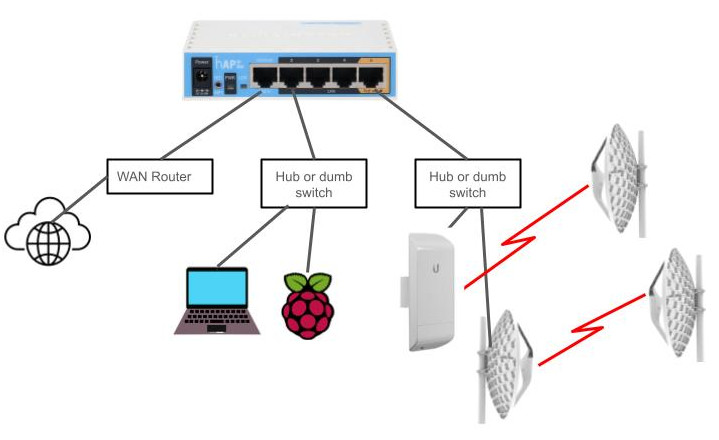
This is an example of a potential location setup. It shows a MikroTic hAP lite as the controlling node for multiple local devices and other nodes.
Port 1 is your connection to the outside world. It will allow devices on ports 2 – 4 to access the internet. Connect it to your existing switch or router with internet access. A computer connected to a switch on this port will only be able to connect to this hAP and no other nodes on the network.
Ports 2 – 4 is where you will connect a computer to access other nodes on the AREDN. It is also where you would connect servers or computers that will provide services. A dumb switch can be used to connect more than 3 devices.
Port 5 is for device to device (DTD) connections. A separate radio node with AREDN firmware – like the MicroTik LHG – can be connected for a more directional RF connection to a distant node. More than 1 additional node, for example to connect to another node in a different direction, would require the use of a dumb switch.
Firmware Guides
Glossary
AREDN: Amateur Radio Emergnacy Data Network.
Node: A single device running AREDN firmware. The node may be accessable by RF, internet tunnel, or directly connected from Device to Device (DTD).
Super Node: A node – typically without an RF radio – configured to connect multiple local nodes to other groups of nodes outside the local area.
